What Is a Speech Timer and Why Do You Need One?
A speech timer is an essential tool for anyone who speaks in front of an audience. Whether you are a Toastmasters member preparing for your Ice Breaker, a keynote presenter at a corporate conference, a teacher giving students equal time for classroom presentations, or a wedding guest delivering a toast, staying within your allotted speaking time is a mark of professionalism and respect for your audience. Running long derails schedules, frustrates event organizers, and — perhaps most importantly — loses the attention of listeners who have mentally checked out once a speaker exceeds their time slot.
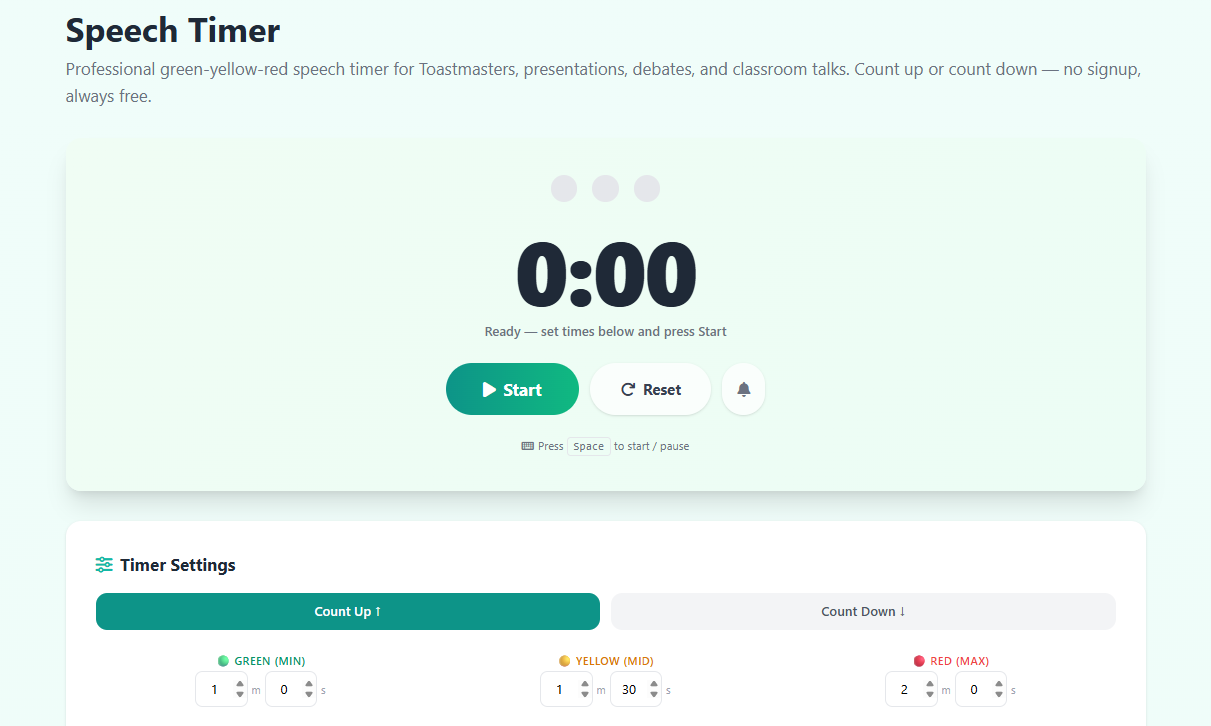
This free online speech timer solves that problem with a simple, distraction-free interface built around the internationally recognized traffic light color system. Green means you are safely within your time, yellow signals your midpoint warning, and red tells you to wrap up. No fumbling with a wristwatch, no awkward eye contact with a timekeeper — just an instant visual cue that you can see from across a room.
How the Green-Yellow-Red Traffic Light System Works
The traffic light presentation timer system was popularized by Toastmasters International and has since been adopted by conference organizers, debate coaches, teachers, and professional facilitators worldwide. The logic is elegant: at the start of a speech, the clock runs on a neutral background. When the speaker reaches their minimum acceptable speaking time, the display switches to green — confirming that they have delivered enough content to meet the floor. At the midpoint warning time, it shifts to yellow, alerting the speaker to begin moving toward their conclusion. When the maximum time is reached, the display flashes red, signaling that they must stop immediately.
This three-color visual language requires zero training for audiences or speakers to understand. It is universally legible even from a distance, works without sound in noisy environments, and eliminates the embarrassment of a human timekeeper frantically waving cards. Our speech timer implements this exact protocol and lets you configure all three thresholds to the precise second, so it works for any event format worldwide.
Using This Speech Timer for Toastmasters Meetings
Toastmasters International is the world's largest public speaking and leadership organization, with over 350,000 members in more than 140 countries. Every Toastmasters meeting follows a structured agenda where each speech type has its own exact timing window. The Sergeant-at-Arms or an appointed timer traditionally holds colored cards to signal speakers — but digital timers displayed on a screen or tablet are increasingly popular, especially for hybrid and online club meetings.
Our built-in Toastmasters presets cover all common speech formats. The Table Topics preset is configured for 0:30 green, 1:00 yellow, 1:30 red — exactly matching the impromptu speaking segment that Toastmasters members know well. The Ice Breaker uses 4:00–5:00–6:00, the standard Prepared Speech slot uses 5:00–6:00–7:00, and Evaluations run 1:00–1:30–2:00. Simply click the preset button and the timer is ready to go, no manual entry needed.
Count Up vs Count Down: Which Mode Should You Use?
Our speech timer supports both counting modes and you can switch between them without losing your time settings. Count-up mode starts at zero and shows total elapsed speaking time. This is the traditional approach for Toastmasters timers and open-ended events where you want to see exactly how long someone has spoken. The traffic light colors still activate at your configured thresholds, so the visual cues work identically regardless of direction.
Count-down mode starts from your maximum time and counts to zero. Many speakers prefer this because it shows remaining time rather than elapsed time — psychologically, seeing seconds ticking down toward zero creates a sense of urgency that helps with pacing. Presenters at TED-style conferences often prefer countdown mode because they can pace their delivery based on how much time they have left rather than how much they have used. If you are practicing a prepared speech against a hard deadline, count-down mode is highly recommended.
The Words-to-Speech-Time Calculator Explained
One of the most common mistakes speakers make is writing a script without checking whether it actually fits their time slot. Research from speaking coaches and language institutes consistently shows that the average conversational English speaker delivers approximately 130 to 150 words per minute in a prepared speech context. A fast speaker might hit 165 to 175 words per minute; a slow, deliberate speaker with pauses for effect may drop to 100 to 120 words per minute.
Our built-in word count calculator lets you paste your entire script and immediately see your estimated speaking time at slow, average, and fast paces. This lets you trim or expand your material before stepping on stage. The calculation happens entirely in your browser — your script is never uploaded or stored. For a 5-minute speech slot (Toastmasters Ice Breaker maximum), you typically need between 550 and 800 words depending on your delivery pace. For a 7-minute speech maximum, aim for 770 to 1,050 words.
Using a Speech Timer for Classroom Presentations and Education
Teachers at every level from primary school to university use timed presentations to build students' public speaking confidence, ensure fairness between presenters, and manage class time efficiently. A digital speech timer displayed on a projector screen gives every student the same visual reference, eliminates arguments about whether someone went over time, and teaches young speakers the professional skill of respecting time constraints. For dedicated classroom time management, our Classroom Timer offers additional features designed specifically for teaching environments.
Debate coaches use speech timers for every round of competitive debate, where speaking time precision can affect scoring. Model UN advisors time delegate speeches. Drama and speech teachers use countdown timers during monologue rehearsals. The traffic light system eliminates the need for a human timekeeper in small classroom settings, freeing the teacher to observe content quality rather than watching a clock.
Tips for Staying Within Your Time Limit
Experienced public speakers develop a strong internal clock through deliberate practice. Rehearsing with a speech timer at least three times before an event dramatically improves your ability to hit your target time on stage. In your first rehearsal, simply deliver your speech naturally and note how far over or under you run. In the second rehearsal, make adjustments — cut content if you were too long, add examples if you were too short, or adjust your pacing. In the third rehearsal, aim to finish within 30 seconds of your target on the first pass.
On the day of your presentation, remember that adrenaline tends to speed up delivery. If you finish early in practice, you may hit your time perfectly on stage. Pausing for emphasis, breathing between paragraphs, and allowing audience laughter or reaction to land naturally all add seconds to your delivery. Good speakers budget for this by running 15 to 20 seconds under their maximum in practice, giving themselves a comfortable cushion for live-audience dynamics.
Related Timer Tools You May Find Useful
If you need a break timer between speaker sessions, our Break Timer is designed exactly for that use case. For longer structured sessions, check out our Study Timer. For event countdowns and interval management, the Countdown Clock Timer is a versatile option. If you are moderating back-to-back speakers at a conference, you can quickly reset this speech timer between talks without ever leaving the page — just press Reset, select your next preset, and press Start again.