The Complete Rubik's Cube Timer for Speedcubers of Every Level
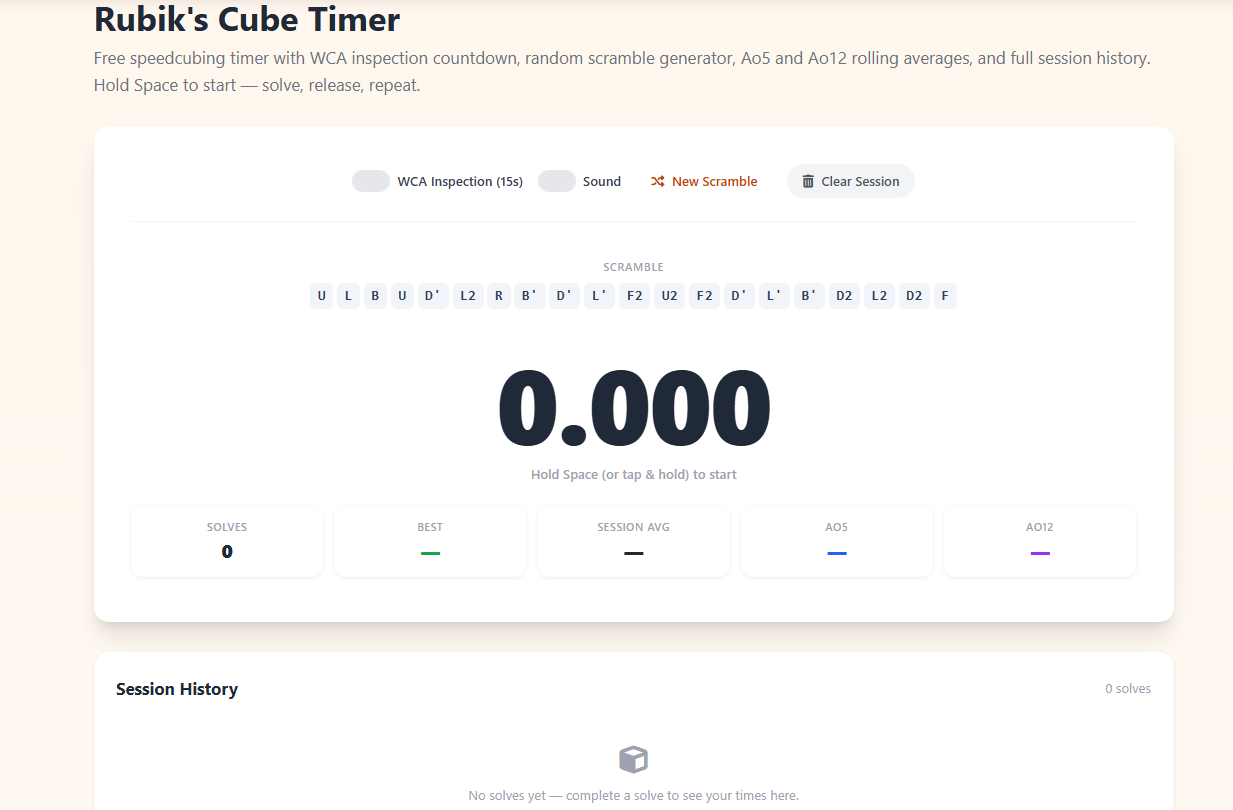
Speedcubing is one of the most rapidly growing competitive hobbies in the world, with official World Cube Association events held in over 100 countries and hundreds of thousands of active participants logging practice times every single day. Whether you're a beginner working to crack the 2-minute barrier, an intermediate solver targeting sub-30 seconds, or an advanced competitor chasing a personal best under 15 seconds, having a proper cube timer is not optional — it's the foundation of deliberate, measurable improvement. This free Rubik's cube timer gives you everything you need in one clean, browser-based interface: a precision stopwatch, a WCA-compliant inspection countdown, a random scramble generator, Ao5 and Ao12 rolling averages, and a full session history.
How to Use This Cube Timer: The Hold-to-Start System
Professional speedcubing timers — including the iconic SpeedStacks Stackmat used at all official WCA events — require the solver to hold both sensor pads until the display turns green before releasing to begin. This timer replicates that behavior digitally. Hold the Spacebar (or hold the screen on touch devices) for at least half a second. The display turns green when it's ready. Release to start the clock. The timer begins counting in hundredths of a second, exactly like a competition-grade stackmat. When your solve is complete, press Spacebar again (or tap the screen) to stop. Your time is recorded immediately in the session history, a new scramble is generated, and you're ready for the next solve with no wasted time.
WCA Inspection Time: What It Is and Why It Matters
Every competitor at an official WCA event receives 15 seconds of inspection time before a solve begins. During inspection, you can pick up and turn the cube to look at it, but you cannot start solving. The inspection countdown runs out loud — an official judge calls "8 seconds" and "12 seconds" as warnings. This inspection time is crucial: top competitors use it to spot their first several moves, confirm cross color, identify easy F2L cases, and mentally plan the first 5 to 8 moves of their solution. Enabling WCA inspection on this timer trains you to use that 15-second window productively rather than scrambling to get oriented. A 15-second inspection bar appears and drains visually as your time counts down. If you exceed inspection, a +2 penalty would apply in competition — this timer logs a note so you're aware.
Understanding Ao5 and Ao12 Averages
Raw best times tell you what's possible on a perfect day. Averages tell you where you actually are. The two standard speedcubing averages are Ao5 (Average of 5) and Ao12 (Average of 12). An Ao5 takes your most recent 5 solve times, removes the single best and single worst time, and averages the remaining three. An Ao12 applies the same logic to your last 12 solves — remove best and worst, average the remaining ten. The Ao12 is considered the gold standard for measuring your true skill level because it accounts for consistency and minimizes the impact of lucky or unlucky scrambles. Most competitions judge competitors by their Ao5 in each round. This timer calculates both in real time — as soon as you have enough solves in your session, the stats update after each new time. Watching your Ao12 trend downward over a session is one of the most motivating experiences in speedcubing.
The Scramble Generator: WCA Move Notation
Every serious speedcubing practice session requires a fresh, random scramble before each solve. Solving the same state twice doesn't just reduce the value of that session — it actively builds incorrect muscle memory for that specific state. This timer generates 20-move random scrambles using standard WCA notation: U (Up), D (Down), L (Left), R (Right), F (Front), B (Back). A plain letter means a clockwise quarter turn. An apostrophe (e.g., R') means counter-clockwise. A 2 (e.g., U2) means a half turn. These scrambles are generated fresh after every solve and can also be regenerated manually at any time with the "New Scramble" button. While the scramble generator doesn't use the official WCA scramble program (which requires a software download), the random 20-move sequences produced are appropriate for all beginner and intermediate practice sessions.
How to Improve Your Cube Times: A Framework for Deliberate Practice
The most common mistake beginners make is practicing without structure: they scramble, solve, repeat, but never analyze. Tracking your session with a timer changes that. First, focus on the cross. For CFOP solvers — the most widely used method at advanced levels — a well-planned cross should take no more than 3 to 4 seconds. Second, drill two-look OLL and PLL algorithms until they're automatic. The recognition time, not the execution speed, is what separates 30-second solvers from 20-second solvers at this stage. Third, track your Ao12 across multiple sessions. If it's not improving week over week, analyze your solve recordings to find the bottleneck — usually it's one F2L slot or a handful of PLL cases that aren't instinctive yet. For those who want to pair cube practice with structured focus sessions, our Study Timer and Pomodoro Timer pair perfectly for algo drilling.
Speedcubing Milestones and What They Mean
Every cubing community recognizes certain milestone times. Breaking 2 minutes for the first time typically happens after mastering the beginner's layer-by-layer method. Sub-1 minute usually comes with learning full OLL and PLL. Sub-30 is an intermediate milestone that requires efficient F2L pairing. Sub-20 requires advanced F2L look-ahead — the ability to track the next F2L pair while solving the current one. Sub-15 is the threshold commonly associated with competitive placement at regional events. Sub-10 is an elite level achieved by dedicated competitors training multiple hours daily. World records in the 3×3 single solve category have dropped below 3.5 seconds. The overwhelming majority of participants — and most people who find this timer useful — are between 30 seconds and 2 minutes, a range where consistent practice with proper scrambles and tracked averages produces dramatic improvement in just weeks.
Works on Any Device, No Installation Required
This Rubik's cube timer works on any modern browser — Chrome, Firefox, Safari, Edge — on desktop, laptop, tablet, and mobile. On mobile, tap and hold the timer area to replace the keyboard interaction. Session history lives in your current page session and resets on reload, keeping your data private with no server-side storage. There's no account to create, no app to download, no subscription required. It's completely free. For other timed training and productivity tools that complement your speedcubing sessions, explore our Stopwatch Timer for free-form timing and the Workout Timer for interval-based training of any skill.