The Presentation Timer That Keeps Every Speaker on Track
Every great presentation lives or dies by timing. Too short, and your audience feels cheated out of depth and insight. Too long, and attention collapses, Q&A gets cut, and every subsequent speaker gets squeezed. Whether you're stepping onto a TEDx stage, presenting in a boardroom, leading a university lecture, or running a classroom activity, a reliable presentation timer is your most important non-content tool. This free online presentation timer gives you everything you need: precise countdown, intuitive color warnings, automatic overtime tracking, and zero setup required.
How the Color-Warning System Works
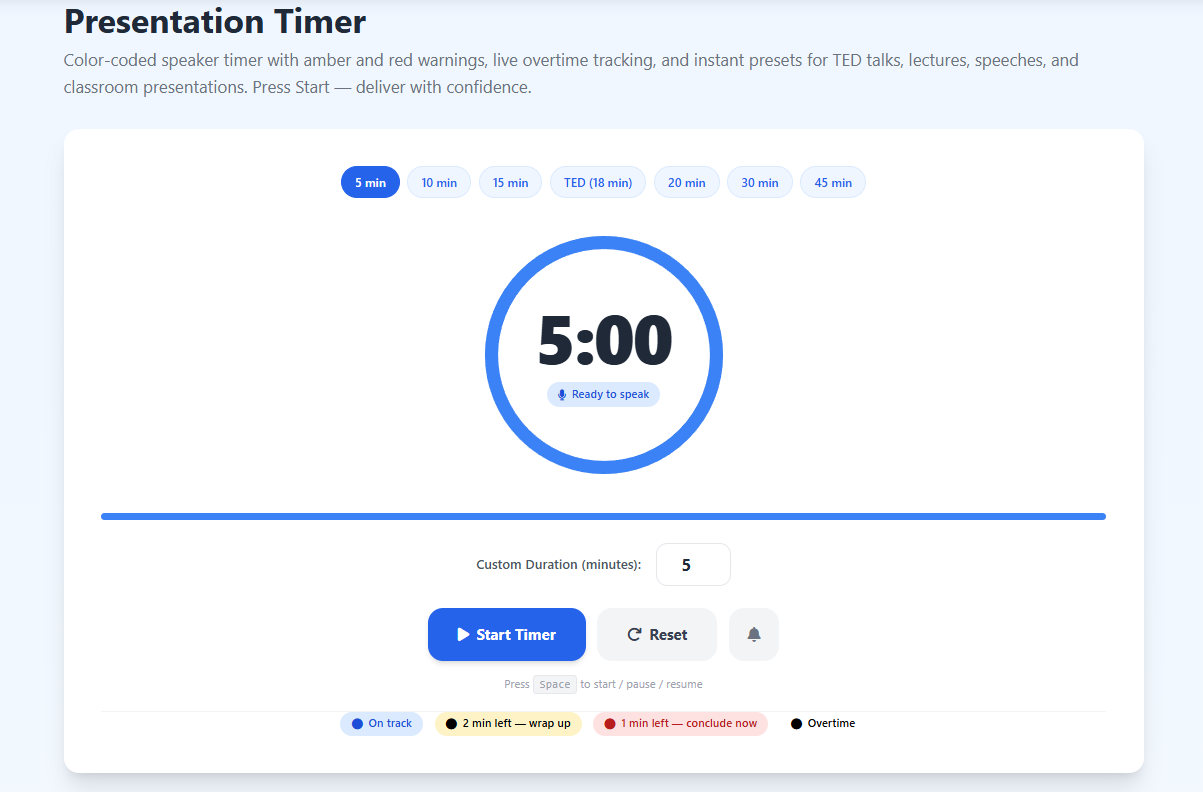
Most professional speaking coaches teach a three-phase awareness model: "in the zone," "time to wrap," and "conclude now." This timer translates that model into a visual language anyone can read at a glance. The ring and display glow blue while you're comfortably within your time window — you can present freely without watching the clock. When 2 minutes remain, the color shifts to amber, signaling that it's time to move toward your conclusion. At 1 minute, everything turns red, making it unmistakable that you must deliver your final point and thank your audience. If you exceed your allotted time, the timer enters overtime mode, displaying a red upward-counting counter so you never lose track of how far over schedule you've gone. This traffic-light approach mirrors what professional conference facilitators use with lighting rigs costing thousands of dollars — and you get it for free in any browser.
Perfect for TED Talks, Lightning Talks, and Keynotes
TED and TEDx talks are capped at 18 minutes — a number chosen deliberately because it's long enough for nuanced argument but short enough to hold full audience attention. Hit the "TED (18 min)" preset and let the color system pace your narrative arc. The amber warning fires at the 16-minute mark, giving you two full minutes to reach your landing. Lightning talks, a popular format at tech conferences and hackathons, typically run just 5 minutes. Startup pitch competitions often allow 3, 5, or 10 minutes. Academic conference presentations are usually 12 to 20 minutes. Each of those has a preset or can be set with the custom duration input, making this tool equally valuable for students, professionals, researchers, and entrepreneurs. For presentations that require strict countdown management alongside study sessions, our Study Timer pairs well for rehearsal prep blocks.
Why Overtime Tracking Matters for Speakers
Many timers simply stop at zero and require a manual reset. That design is useless for real presentations, where you cannot interrupt your own delivery to restart a clock. This presentation timer enters overtime mode automatically, counting upward from zero so you and any facilitators watching the screen can see the overrun accumulating in real time. Professional event hosts, debate judges, academic examiners, and Toastmasters club evaluators all use overtime tracking as a critical feedback mechanism for improvement. Over time, consistently reviewing your overrun patterns reveals exactly which sections of your talk expand beyond plan — almost always the opening, the Q&A setup, or transitions between major points.
Using This Timer for Classroom Presentations and Student Speeches
Teachers who assign timed presentations face a constant challenge: how to enforce time limits fairly without disrupting the student's flow. Projecting this timer on a classroom screen gives every student the same visual cues a professional speaker would have backstage. The blue-to-amber-to-red progression removes any ambiguity — students can self-manage their pacing without the teacher needing to wave or hold up hand signals. This is especially effective for second-language learners and students with anxiety around public speaking, because the clear visual feedback removes the ambiguity of "am I running too long?" For broader classroom time management needs, explore our dedicated Classroom Timer built specifically for educational environments.
Presentation Length Guidelines by Format
Understanding standard presentation durations helps you choose the right preset. Academic conference talks typically run 12 to 20 minutes with 5 minutes for questions. Job interview presentations are usually 10 to 15 minutes. Board-level business updates often run 5 to 10 minutes to respect executive time. University thesis defense presentations range from 20 to 30 minutes before examiner questioning begins. Workshop facilitation blocks often use 20 to 45-minute modules. Debate speeches in competitive formats (Lincoln-Douglas, British Parliamentary) are strictly timed from 4 to 8 minutes. Each of these has a natural equivalent among the presets in this timer, or you can enter any custom value in the duration field.
Keyboard and Accessibility Features
Presenters use their hands constantly — clicking a clicker, gesturing, advancing slides. The last thing you want is to hunt for a mouse to start or pause your timer. This presentation timer responds instantly to the Spacebar: one press starts the countdown, another pauses it, a third resumes from exactly where it left off. The bell icon enables browser push notifications, so even if your presentation app is running in a different window, the notification fires when time runs out. Everything is keyboard-navigable and screen-reader friendly, making this tool accessible to all speakers regardless of assistive technology needs. For collaborative timed presentations and Pomodoro-based rehearsal sessions, see our Pomodoro Timer.
Practice Makes Perfect: Rehearsing with a Timer
Research on public speaking consistently shows that speakers who rehearse with a timer deliver significantly more confident, well-paced presentations than those who rehearse without one. The act of speaking aloud against a countdown forces you to internalize the pace required to cover all your material. Most untimed rehearsals feel shorter than they are — people skip transitions, rush mental summaries, and gloss over examples. When you practice with this timer running, you quickly discover which sections expand in real delivery and which feel rushed. Three or four timed rehearsals before a major talk will reliably cut overruns by 70 percent or more, according to speaker coaching practitioners. The visual progress bar on this timer also serves as a pacing guide during rehearsal, helping you calibrate how far through your content you should be at the halfway mark.
Works on Any Device, Any Time
This presentation timer is fully responsive and optimized for desktop, laptop, tablet, and mobile. You can project it from a laptop connected to a conference room display, keep it on a phone resting on a podium, or run it on a tablet beside your notes. No installation, no account, no subscription — just open the URL and present. For additional timing tools relevant to productivity, coaching, and structured work sessions, try our Workout Timer for interval-based practice or the Stopwatch Timer for free-form timing sessions.